
Most e-commerce brands invest heavily in paid acquisition and treat organic as secondary. Yet organic search drives 43% of all e-commerce traffic (Reboot Online). Brand awareness, content, technical SEO, and site structure all contribute to that number.
Internal linking is the structural piece most stores get wrong. Not because they ignore it, but because e-commerce linking is harder than on content sites.
Thousands of pages. Constant product rotation. Links generated by templates, not by editorial decisions. This article covers what makes e-commerce linking different and the patterns that work.
Why e-commerce sites have a different linking problem
Most internal links on e-commerce sites are generated automatically by CMS templates: navigation menus, breadcrumbs, "related products" widgets. These links exist, but they carry less signal than contextual editorial links. The real challenge is directing authority toward the pages that drive revenue.
A Reboot Online study found that 86% of e-commerce brands lack optimized internal links. Even among the highest-visibility sites, 41% are under-optimized.
Why this is structural, not just neglect:
| Challenge | Content site | E-commerce site |
|---|---|---|
| Page count | Hundreds | Thousands to millions |
| Link creation | Editorial (author adds links) | Template-generated (CMS does it) |
| Page lifecycle | Stable (articles stay published) | Volatile (products added/removed weekly) |
| Data source | CMS only | PIM for product data, CMS for content |
That last row is the invisible gap. Contextual links inside product descriptions require coordination between PIM and CMS. Most teams don't have a process for this, which is why most product pages have zero editorial internal links.
The result: navigation and widgets do the linking. Editorial decisions do not.
Product pages are not endpoints
A large share of organic e-commerce traffic lands directly on product detail pages (PDPs). If those pages only link sideways to other products via widgets, they never redistribute authority or users toward other levels of your site.
PDPs typically have cross-sell links ("you might also like," "frequently bought together"). These are contextual in the sense that they relate to the product.
But they stay within the product silo. Breadcrumbs handle the upward link to the parent category. What PDPs almost never do is link outward to content: a buying guide, a blog post explaining the use case, a comparison article.
- ✓ PDP as hub: cross-sells to related products + breadcrumb to category + contextual link to a relevant buying guide or blog post. User can explore. Authority flows in multiple directions.
- ❌ PDP as silo: cross-sells to related products + breadcrumb only. User either buys or bounces. Authority stays within the product level and never reaches content pages.
The fix is not removing widgets. It is adding editorial links that connect the PDP to other levels of the site structure.
A product description that mentions "running on rocky terrain" links the PDP to a guide. That is an editorial link the breadcrumb and cross-sell widgets cannot replace.
These are the links most PDPs are missing.
Four linking patterns that work
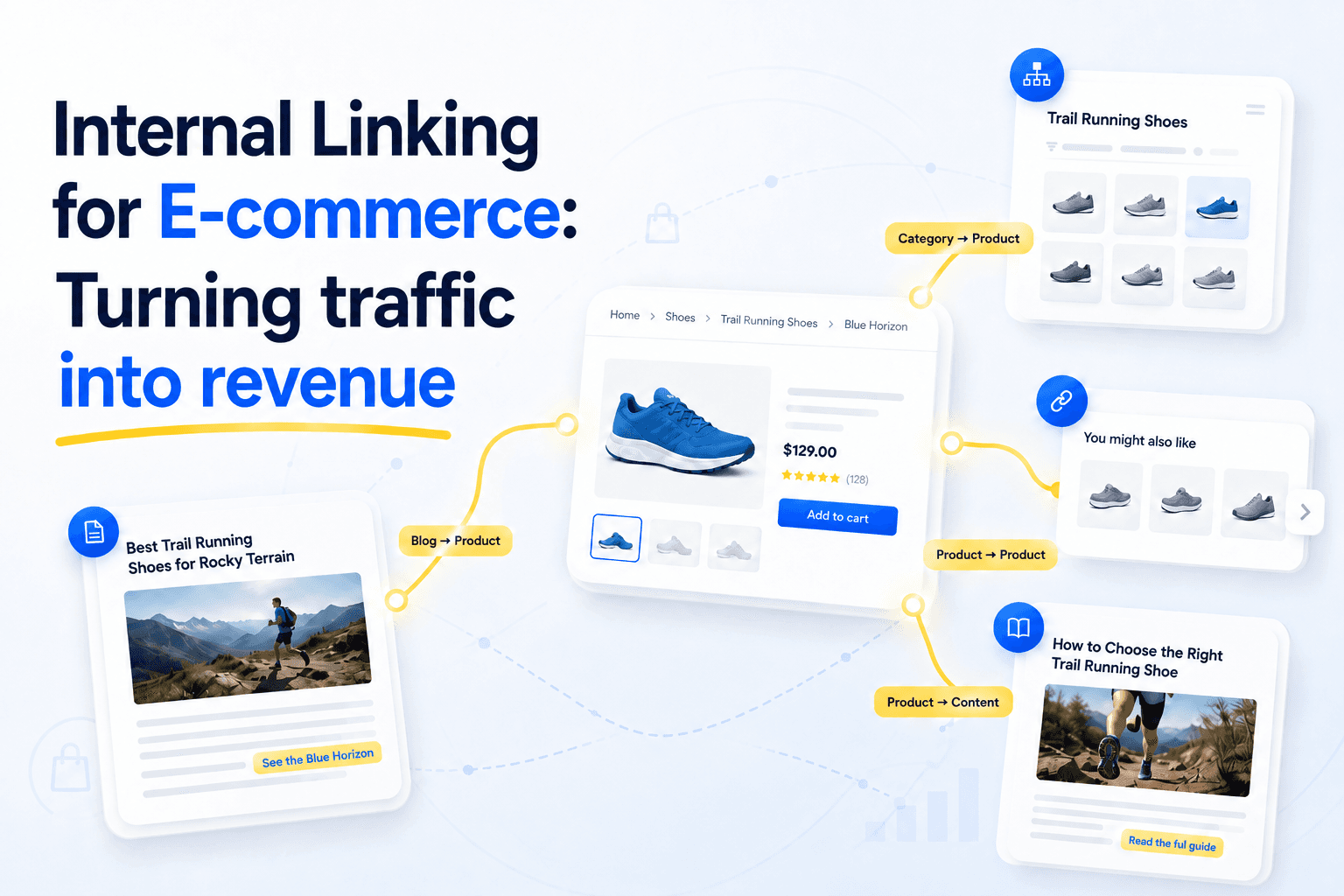
E-commerce internal linking comes down to four patterns. Each serves a different purpose. Most sites rely on the first two and miss the last two entirely.
| Pattern | Job | Example |
|---|---|---|
| Category → Product | Makes products discoverable to crawlers and users | Category page lists and links to each product |
| Product → Product | Cross-sells, keeps users in the purchase flow | "Pairs well with our [oak cutting board]" in description |
| Blog → Product | Bridges backlink authority from content to commerce | Buying guide links to specific products it recommends |
| Product → Content | Connects PDPs to guides and articles, breaks the silo | "Learn how to choose the right blade" from a PDP |
The first two are usually handled by the CMS.
Category-to-product linking is automatic: the CMS assigns products to categories. The real question is whether the product is visible within 3 clicks of the homepage, or buried on page 12 of a paginated category with 500 items.
Crawl depth matters more than category assignment.
Product-to-product cross-sells are typically widget-based. They work, but a contextual link in the product description carries more semantic signal than a template widget.
The last two are where most sites fall short.
Blog → Product is the highest-leverage pattern most e-commerce sites neglect. A buying guide or how-to article that earns 50 backlinks but contains zero links to product pages is an authority dead end. The authority enters your site through the blog and stays in the blog.
The fix: every content piece that discusses a product category should link contextually to at least one product or category page. Not a CTA at the bottom ("check out our products").
A woven link in the text where the product is part of the argument.
Product → Content breaks the product silo. A PDP that links to a relevant buying guide or comparison article sends users deeper into the site and distributes authority toward content that can earn backlinks.
Breadcrumbs handle the upward link to the parent category. This pattern handles the outward link to content. It is the least common and the most valuable for turning PDPs from dead ends into hubs.
How to keep it working when everything changes
E-commerce internal linking breaks the moment you stop maintaining it. Product rotation, navigation updates, and seasonal changes create link debt that accumulates silently.
A seoClarity case study documented exactly this. A retailer updated its navigation to feature new trendy brands.
The old best-sellers quietly lost their navigation links. Traffic dropped. The fix: re-adding internal links to those products, which led to a +23% organic traffic recovery.
Nobody noticed the links were gone until the traffic disappeared.
Three practices that prevent this:
1. On every new product launch.
The CMS assigns it to a category. That is not enough.
Check that the product is reachable within 3 clicks of the homepage (not buried in deep pagination). Add at least one contextual link from an existing blog post or guide.
2. On every deprecation.
Redirect the URL to the closest relevant alternative. Update any editorial links that pointed to it.
Remove it from the sitemap. A deprecated product that still gets crawled wastes crawl budget.
3. Quarterly audit.
Run a full internal link audit to catch what slipped through: orphaned products buried in pagination, dead-end PDPs with no upward links, blog posts that earned backlinks but never linked to products.